In the field of web development, developing a RESTful API is critical for facilitating communication between various software applications. PHP’s versatility and comprehensive support make it a good choice for implementing a strong and efficient API. In this post, we will lead you through the steps of developing a RESTful API with PHP, covering important topics such as API creation, integration, and best practices. If you need experienced assistance, Hire PHP developers to design and create a scalable API that suits your specific requirements.
Key Concepts of RESTful APIs
- Resources: In a RESTful API, resources are the key entities that clients interact with. These can be anything from user data to products or services.
- HTTP Methods: RESTful APIs utilize standard HTTP methods:
- GET: Retrieve data from the server.
- POST: Create a new resource on the server.
- PUT: Update an existing resource.
- PATCH: Apply partial modifications to a resource.
- DELETE: Remove a resource from the server.
- Endpoints: Each resource is accessed through a specific URL, known as an endpoint. A well-structured API should have clear and consistent endpoint naming conventions.
Setting Up Your Development Environment
Before you start developing your RESTful API with PHP, it’s essential to establish a robust development environment. This will ensure that you can efficiently build, test, and deploy your API. Below are the key components required for setting up your environment
Web Server
- Apache: Known for its flexibility and wide adoption, Apache is a great choice for PHP applications.
- Nginx: Renowned for its performance and ability to handle concurrent connections, Nginx is ideal for high-traffic APIs.
PHP
- Ensure that you have PHP 7.0 or higher installed on your server.
- Newer versions of PHP offer enhanced features and improved performance, which are beneficial for API development.
Database
- MySQL: A widely-used relational database that integrates well with PHP and is perfect for storing structured data.
- MariaDB: A fork of MySQL that offers enhanced performance and additional features.
Development Tools
- Postman or Insomnia: API testing tools that allow you to send requests and receive responses, making it easier to test API endpoints effectively.
Version Control
- Use a version control system such as Git to track code changes, collaborate with other developers, and maintain an organized project history.
IDE or Text Editor
- Visual Studio Code: A lightweight yet powerful editor with many extensions tailored for PHP development.
- PHPStorm: A robust IDE designed specifically for PHP, offering advanced features and development tools.
By carefully selecting and configuring these components, you’ll create a solid foundation for your API development project. With the right tools in place, you can focus on implementing features and ensuring that your API functions smoothly and efficiently.
Step 1: Designing Your API
A well-structured design is the foundation of any successful API. Before writing any code, it’s essential to outline the resources you intend to expose through your API and the operations that clients can perform on those resources. The following methods are standard in RESTful API design:
GET
This method retrieves data from the server. It is commonly used to fetch a list of resources or a specific resource based on an identifier.
Examples:
- GET /api/v1/posts – Retrieve all blog posts.
- GET /api/v1/posts/{id} – Retrieve a specific blog post by its ID.
POST
This method is used to create new resources on the server. When a client sends a POST request, it typically includes a request body containing the data for the new resource.
Example:
- POST /api/v1/posts – Create a new blog post.
PATCH
This method applies partial modifications to a resource. Unlike PUT, which replaces the entire resource, PATCH allows clients to send only the fields that need to be updated.
Example:
- PATCH /api/v1/posts/{id} – Update specific fields of an existing blog post.
PUT
This method updates an existing resource or creates a new resource if it does not exist. When using PUT, the client sends a complete representation of the resource.
Example:
- PUT /api/v1/posts/{id} – Update the entire blog post with the specified ID.
DELETE
This method removes a resource from the server. It is used to delete a specific resource identified by its URL.
Example:
- DELETE /api/v1/posts/{id} – Delete a blog post with the specified ID.
Resource Planning
In addition to defining the methods, you should plan the resources that your API will manage. For instance, if you are developing a blogging platform, you might have the following resources:
- Posts: Represents individual blog entries.
- Comments: Represents user comments on blog posts.
- Users: Represents authors or readers of the blog.
By clearly outlining your API’s resources and their corresponding actions, you create a blueprint that guides the development process. This structured approach ensures that your API is both intuitive and easy to use for developers who will interact with it.
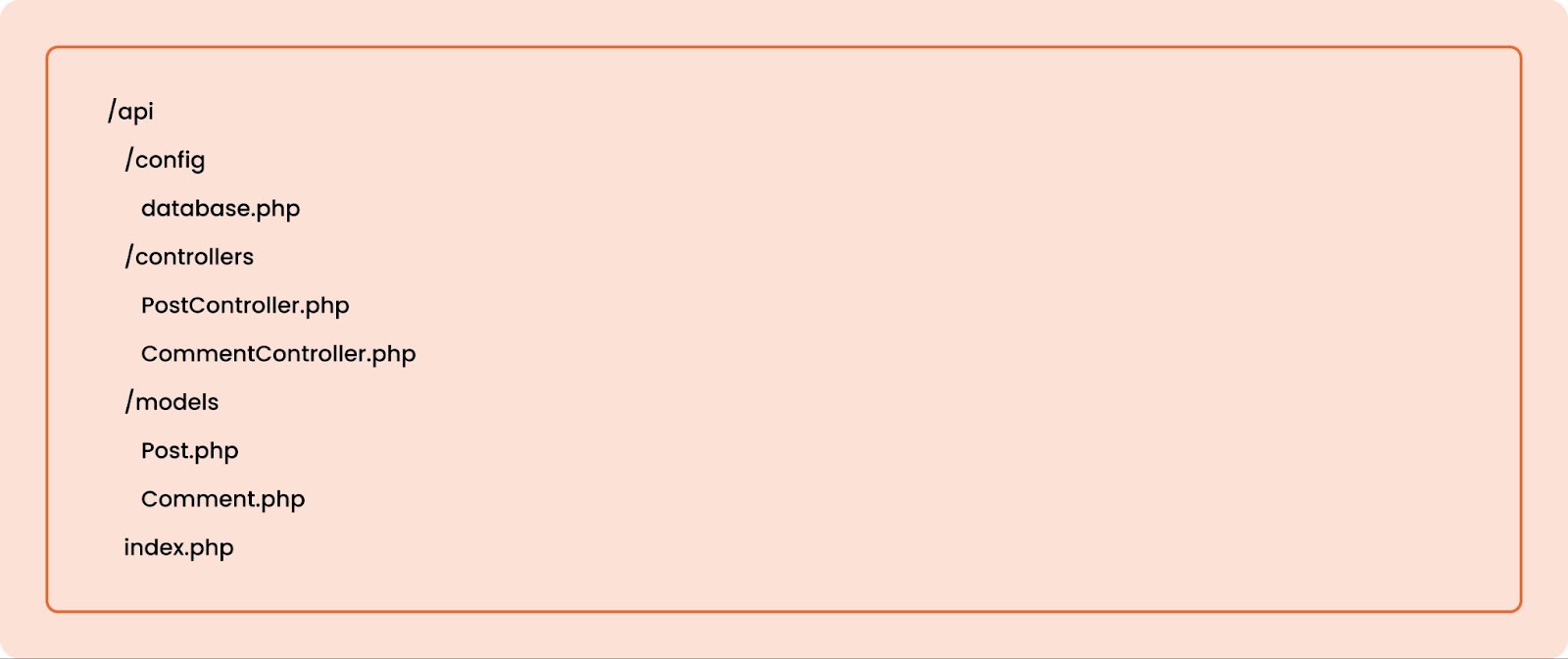
Step 2: Creating the API Structure
Create a folder structure for your API project. Here’s a simple example:
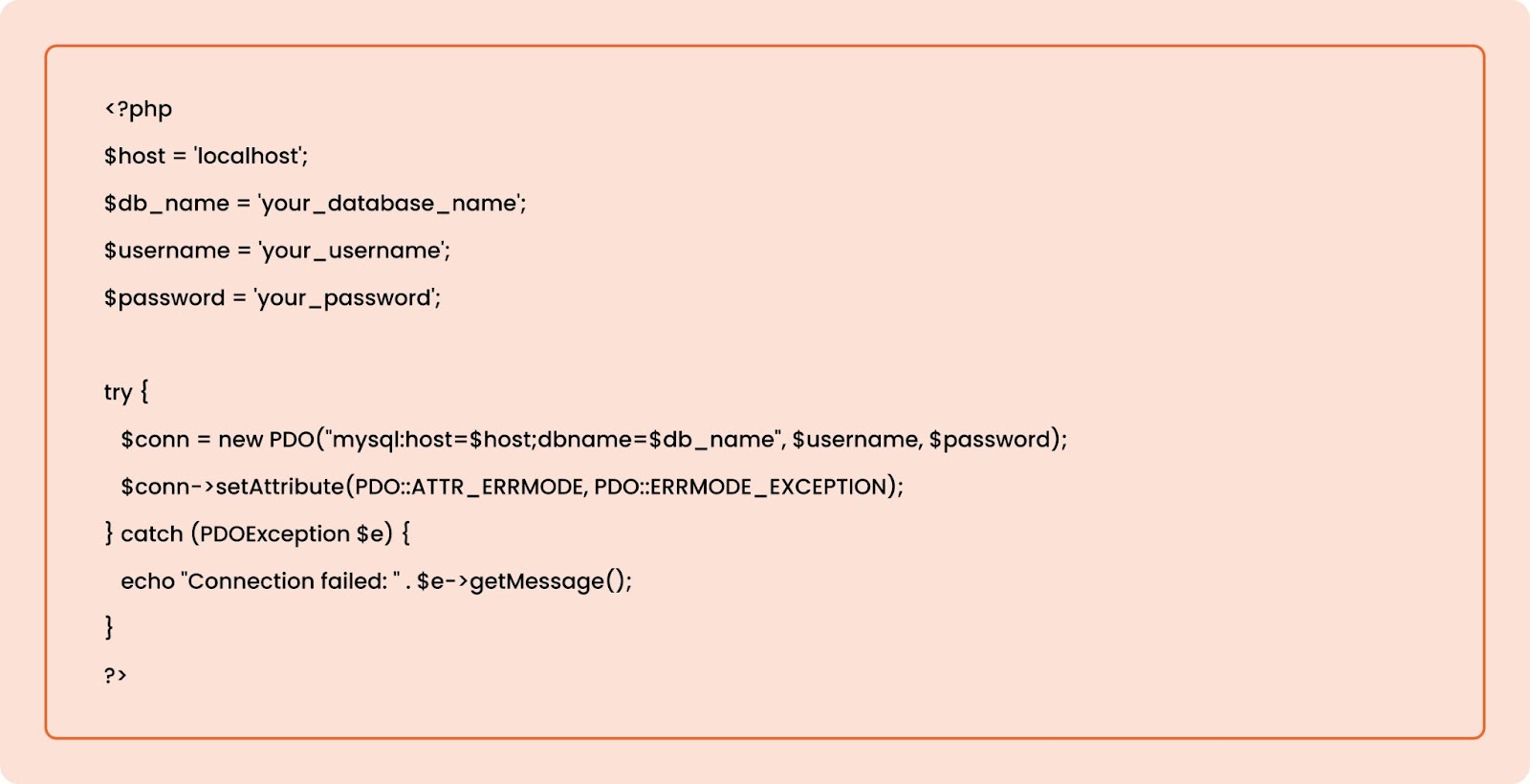
Configuring the Database
In your config/database.php, establish a connection to your database:
Step 3: Creating Models
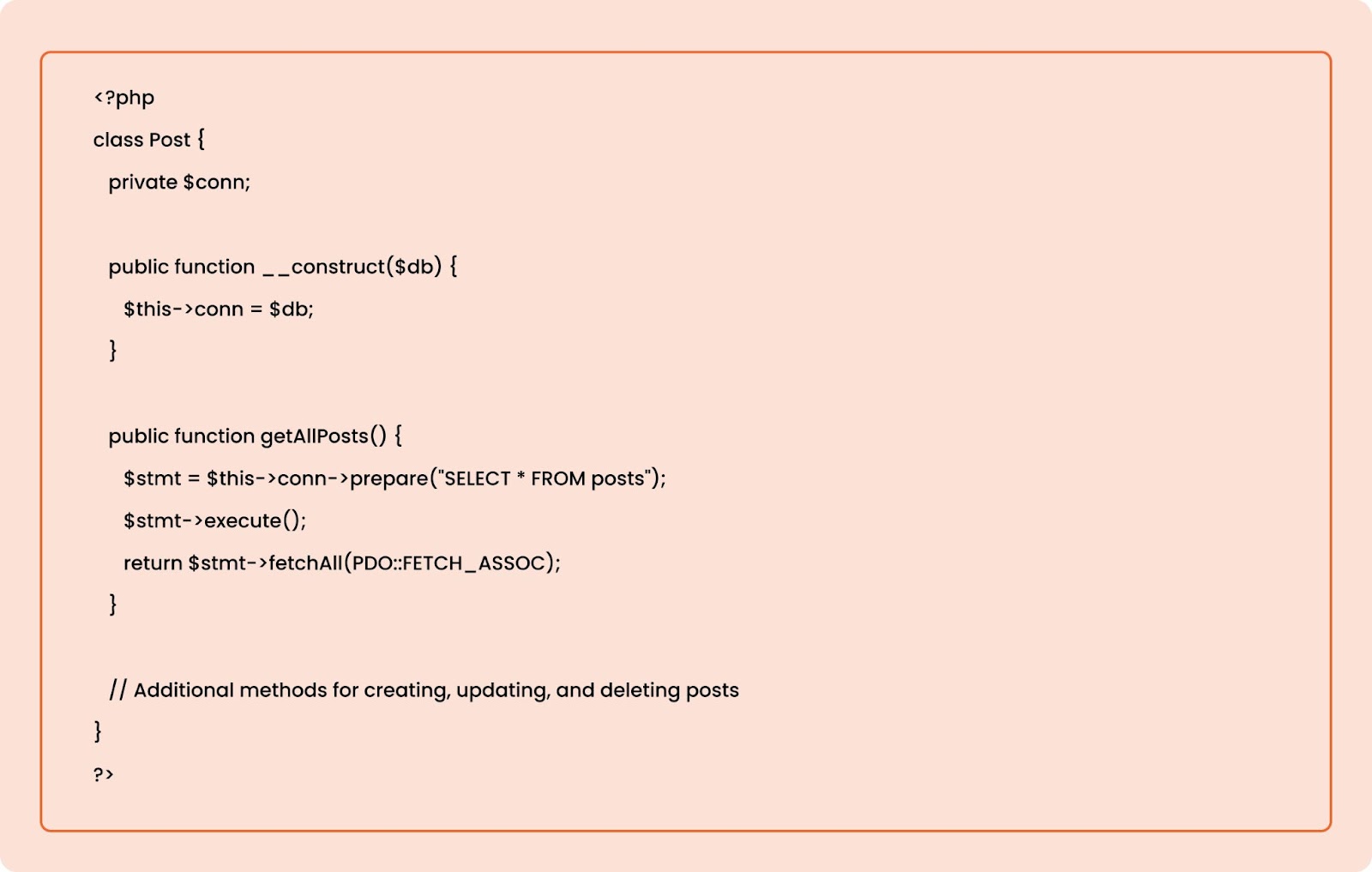
Models represent your data and contain functions to interact with the database. For example, in models/Post.php, you might have:
Step 4: Creating Controllers
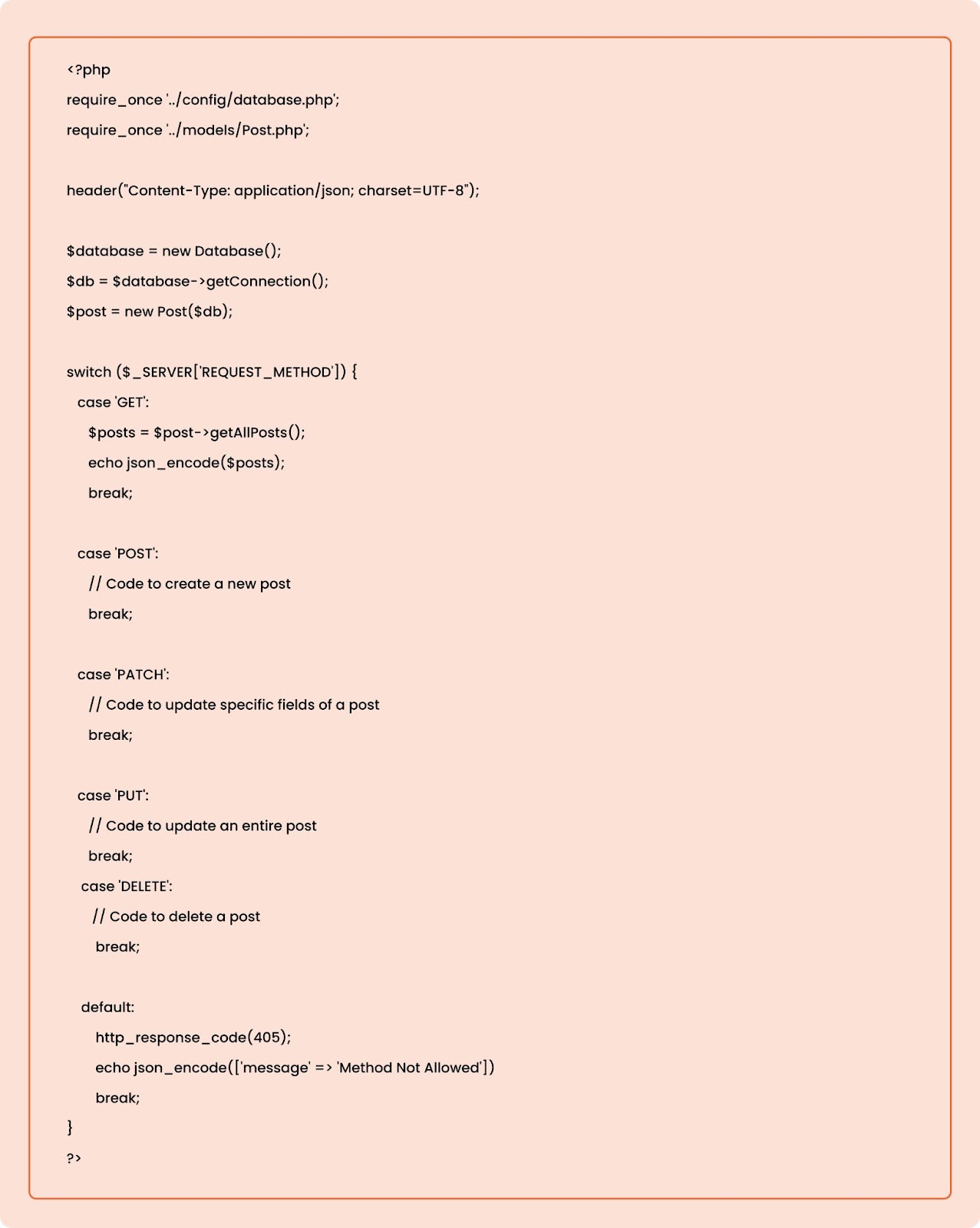
Controllers handle the incoming requests and interact with the models. In controllers/PostController.php, you can set up your endpoints:
Step 5: Routing Requests
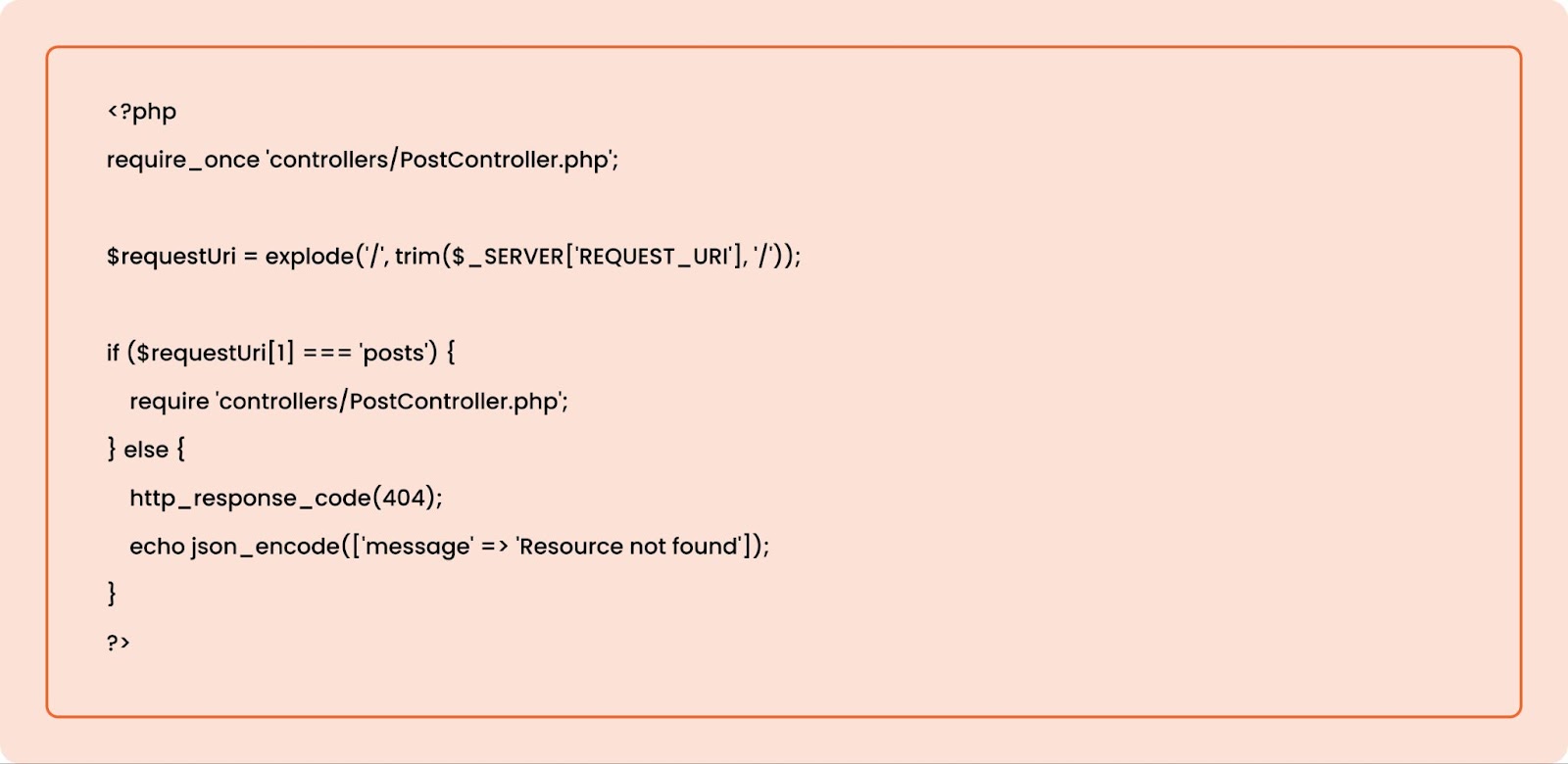
In index.php, you will route incoming requests to the appropriate controller based on the requested endpoint:
Step 6: Testing Your API
Once you have your API set up, use Postman or Insomnia to test your endpoints. Make sure to test all HTTP methods and ensure they return the expected results.
Best Practices for API Development
- Version Your API: Include versioning in your API endpoints (e.g., /api/v1/posts) to ensure backward compatibility as your API evolves.
- Use Proper Status Codes: Return appropriate HTTP status codes based on the outcome of requests (e.g., 200 for success, 404 for not found, 500 for server errors).
- Documentation: Provide clear documentation for your API to help developers understand how to use it effectively.
- Security: Implement authentication and authorization mechanisms to protect your API from unauthorized access.
Conclusion
Creating a RESTful API with PHP can significantly enhance the capabilities of your web applications, enabling seamless communication between various systems. By following the steps outlined in this guide, you can build a robust API that meets your business requirements. For a more professional approach, consider partnering with experts who specialize in API development and API integration. At Orbitwebtech, we pride ourselves on being the best web development company, ready to assist you in creating high-quality web solutions tailored to your needs.